Trivy: One Scanner to Rule Your Containers, Repos, and Kubernetes Configs
Instead of stitching together five different security tools, Trivy handles CVEs, misconfigs, secrets, and SBOM generation across every target in your pipeline — from a single CLI.
Security scanning in a modern pipeline has a sprawl problem. You need one tool for container vulnerabilities, another for IaC misconfigurations, another for secret detection, maybe another for SBOM generation. Aqua Security's open-source Trivy is a direct answer to that fragmentation — a single scanner that covers most of what a developer needs to ship securely, without context-switching between tools.
With 36.2k GitHub stars and 87 releases (latest: v0.71.0), Trivy has become a serious fixture in the DevSecOps toolchain.
What Trivy Scans, and Where
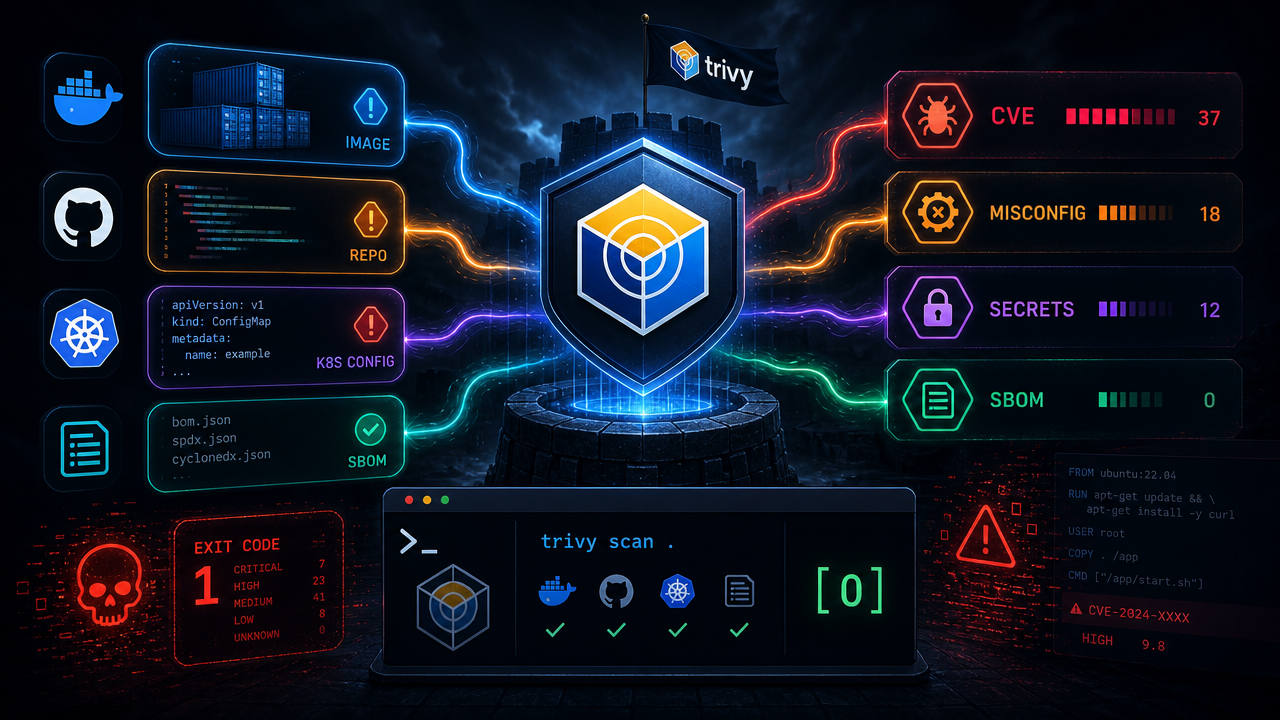
Trivy separates its model into targets (what you point it at) and scanners (what it looks for). That clean separation makes it easy to reason about coverage.
Targets:
- Container images
- Filesystems
- Remote Git repositories
- Virtual machine images
- Kubernetes clusters
Scanners:
- OS packages and language dependencies (SBOM)
- Known vulnerabilities (CVEs)
- IaC misconfigurations
- Secrets and sensitive information
- Software licenses
The combination means you can run the same tool against a python:3.4-alpine image pulled from a registry, a local project directory, or an entire live Kubernetes cluster — and get consistent, structured output each time.
CLI Usage That Actually Makes Sense
The command syntax follows a consistent pattern:
trivy <target> [--scanners <scanner1,scanner2>] <subject>
Scanning an image for vulnerabilities:
trivy image python:3.4-alpine
Scanning a local project directory for vulnerabilities, secrets, and misconfigurations simultaneously:
trivy fs --scanners vuln,secret,misconfig myproject/
Getting a summary report across a whole Kubernetes cluster:
trivy k8s --report summary cluster
The --scanners flag is the key ergonomic win: you opt into exactly the checks you want rather than getting flooded with noise from scanners irrelevant to the context.
Getting It Into Your Stack
Installation covers the usual bases:
# macOS / Linux via Homebrew
brew install trivy

# Docker
docker run aquasec/trivy image python:3.4-alpine

# Or grab a binary directly from GitHub Releases
Beyond local use, Trivy ships first-class integrations with GitHub Actions, a Kubernetes operator for continuous in-cluster scanning, and a VS Code plugin for catching issues before a line of code ever leaves your editor. The Kubernetes operator in particular is worth a look if you want policy enforcement baked into your cluster rather than bolted on at the CI boundary.
For teams that want canary access to new features, Trivy publishes Docker Hub, GitHub, and ECR images on every push to main — though the project explicitly flags these as potentially unstable and not recommended for production.
Why It Matters for Your Pipeline
The consolidation argument is straightforward: fewer tools mean fewer credentials to rotate, fewer pipeline steps to maintain, and a single CVE database and config schema to reason about. When a new vulnerability class emerges — say, a fresh batch of secret patterns or a new IaC provider — you update one dependency, not five.
Trivy is written almost entirely in Go (99.5% of the codebase), which keeps the binary self-contained and fast enough to run as a blocking step in CI without adding significant wall-clock time to builds.
The Apache-2.0 license keeps it usable in commercial pipelines without legal headaches. Aqua Security does offer a commercial tier that builds on top of Trivy, but the open-source version is complete and production-grade on its own — not a stripped-down lead-gen tool.
If you're currently running separate scanners for images, secrets, and IaC configs, Trivy is worth a serious evaluation as a consolidation target. The docs and ecosystem page at trivy.dev cover the full scanning coverage matrix.
Discussion 0
Join the discussion
Sign in with GitHub to comment and vote.
No comments yet
Be the first to weigh in.